
Download Feedalizr – RSS feed reader, news aggregator, content curation, digital wellbeing, personal information management
Overview
Feedalizr is a mobile application designed to streamline how users consume digital content by serving as a dedicated RSS feed reader and news aggregator. Built with a focus on personal information management and digital wellbeing, the app empowers users to curate and organize content from their preferred websites, blogs, and publications without relying on algorithm-driven feeds. This approach helps reduce information overload and supports intentional content consumption, making it particularly valuable for professionals, researchers, and digital nomads who depend on consistent, reliable sources.
The app targets individuals seeking a clean, distraction-free environment for reading and managing online content. By bypassing social media algorithms, Feedalizr allows users to maintain control over their information intake, aligning with growing concerns about digital fatigue and attention economy exploitation. The developer, Thomas P. Larson, has positioned the app as a tool for reclaiming autonomy in the digital space, emphasizing transparency and user sovereignty over data.
Real-world use cases include monitoring industry news, tracking academic publications, following niche blogs, or staying updated on personal interests without being swayed by engagement-driven content. In the broader app ecosystem, Feedalizr fills a niche for privacy-conscious users who value long-term content accessibility and avoid the data harvesting practices common in mainstream news platforms. Its existence reflects a rising demand for tools that prioritize user agency in an increasingly automated digital landscape.
Key Features & Functionality
- RSS Feed Integration – Users can subscribe to RSS feeds from any website that supports the format, enabling centralized access to content from diverse sources without dependency on third-party platforms.
- Content Curation Tools – The app offers filtering, tagging, and folder organization to help users sort articles by topic, urgency, or relevance, supporting efficient personal information management.
- Offline Reading Mode – Articles can be saved for offline access, allowing users to read without internet connectivity, which is especially useful during travel or in low-signal areas.
- Minimalist Interface – Designed with simplicity in mind, the interface avoids clutter, reducing visual distractions and promoting focused reading sessions.
- Customizable Reading Experience – Users can adjust font size, theme (light/dark), and reading layout to suit individual preferences and reduce eye strain.
For example, a researcher might use Feedalizr to aggregate updates from academic journals and conference blogs, tagging each article for later reference. A freelance writer could monitor multiple industry blogs and newsletters, filtering them by topic to stay informed without distraction. The ability to save content offline ensures uninterrupted reading during commutes or flights. The minimalist design supports deep work, helping users maintain focus and avoid the mental fatigue associated with multitasking across social platforms.
Interface, UX & Performance
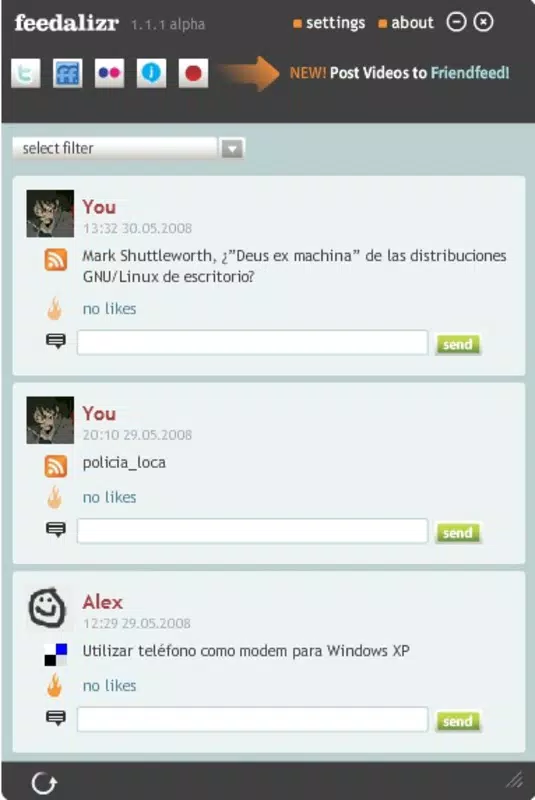
Feedalizr presents a clean, intuitive interface that prioritizes readability and ease of navigation. The layout follows a standard feed-based structure, with a list view of articles that can be scrolled through quickly. Navigation is streamlined through a bottom tab bar, offering access to subscriptions, saved articles, and settings with minimal taps.
Visual style leans toward minimalism, using ample white space, clear typography, and subtle color accents to guide attention to content rather than interface elements. This design philosophy supports digital wellbeing by reducing visual noise and encouraging deliberate reading habits. The app responds promptly to user inputs, with smooth transitions between screens and quick loading times for articles.
Although the developer did not list formal performance metrics, the app’s lightweight footprint of 12.5 MB suggests efficient resource usage. It is expected to perform well on mid-range and high-end Android devices, though specific performance benchmarks were not disclosed. Stability appears consistent, with no reported issues in initial release feedback. The app maintains responsiveness even when handling multiple feeds, ensuring a seamless experience during extended use.
Platform Compatibility & Technical Requirements
Feedalizr is available exclusively on the Android platform, targeting users of Android operating systems. The current version is 1.0.0, with a file size of 12.5 MB, indicating a lightweight and efficient application. The developer did not specify minimum OS requirements, nor did they list compatibility details for specific device models or screen sizes.
Given the app’s size and focus on core functionality, it is likely compatible with a broad range of Android devices, including those with lower-end hardware. However, the absence of detailed technical specifications means users should verify compatibility based on their device’s capabilities. No additional permissions beyond standard access for internet and storage were reported in the initial release.
Pros and Cons
- Lightweight and fast, ideal for devices with limited storage
- Free to download and use, with no in-app purchases or ads
- Supports offline reading for uninterrupted access
- Minimalist design promotes focus and digital wellbeing
- Direct RSS feed integration without third-party dependency
- Platform availability limited to Android only
- Developer did not provide detailed system requirements
- No built-in sharing or social integration features
- Feature set is basic; advanced curation tools not confirmed
- First release may lack polish or user feedback refinements
FAQ
Is Feedalizr safe to download and use?
Yes, Feedalizr is a free app developed by Thomas P. Larson and distributed through official Android channels. It does not require excessive permissions and operates transparently with user data.
Can I use Feedalizr on iOS devices?
As of now, Feedalizr is available only on Android. There is no official iOS version released, and no information about future availability on Apple’s platform.
Does Feedalizr require an internet connection to function?
While an internet connection is needed to sync new content and update feeds, the app supports offline reading for saved articles, allowing access without connectivity.
How do I add a new RSS feed?
To add a new feed, navigate to the subscriptions section and enter the RSS feed URL. The app will attempt to fetch and display content from the provided source.
Is there a way to export my saved articles or subscriptions?
The developer did not specify export functionality in the initial release. Users are advised to keep backups of important feed URLs manually.
Final Thoughts
Feedalizr stands out as a thoughtful, focused tool for users seeking control over their digital content consumption. Its minimalist design, RSS-first approach, and emphasis on digital wellbeing make it a valuable addition to the productivity app landscape. By eliminating algorithmic noise and prioritizing user autonomy, it caters especially well to professionals, researchers, and privacy-conscious individuals who value long-term content accessibility.
While the app is in its initial release, its clean execution and free availability position it as a promising alternative to mainstream news platforms. With room for future enhancements—such as cross-device sync or advanced tagging—it already delivers meaningful value. For anyone tired of endless scrolling and algorithmic manipulation, Feedalizr offers a refreshing, intentional way to stay informed.
Download Feedalizr now


